AddOns Maker for Minecraft
- 3.7
- Rating
- 10.00M
- Installs
- Free
- Price
 Analysis by App-foxy
If you play Minecraft on a phone or tablet and want to move beyond downloading ready-made content, AddOns Maker for Minecraft PE is worth a look. I found it most interesting as a hands-on personalization app: instead of treating Minecraft content as something you only browse and install, it gives you a place to experiment with mods, addons, textures, furniture, skins, and related custom material. The idea is approachable, although the first few minutes can feel busier than the simple store summary suggests.
The app is free to install and belongs to the personalization category. It is made by JoyCraft Studio, carries a Teen content rating, and works on Android devices running version 7.0 or newer. Its current version is 3.9.1. Those details matter because this is not a general Minecraft companion or a new standalone game; it is a creative tool intended to change the way your Minecraft PE experience looks and behaves through user-made content.
I would not describe it as a one-tap solution for every player. You still need patience when choosing what to make, checking how it fits your world, and dealing with the difference between an attractive preview and a useful result. However, if your goal is to create something personal rather than simply collect downloads, the app has a clear reason to exist.
You May Also Like

 Pandora - Music & Podcasts
Pandora’s Music Is Easy to Start, but Harder to Recover
Pandora’s strength is its low-effort path from a seed to a station. Its weak spot is how much confidence it asks you to place in connection, setup, and quiet recovery.

 AccuWeather: Weather Radar
AccuWeather Review: A Quick, Clear Forecast for Everyday Decisions
For everyday plans, the best forecast is the one you can understand quickly. AccuWeather makes rain timing, radar, and local conditions easy to act on, with a few trade-offs.

 Hill Climb Racing
Why Hill Climb Racing Still Turns Crashes Into One More Run
A tiny car, a bumpy hill and one more upgrade: Hill Climb Racing keeps resurfacing because its simple chaos makes every near-miss feel personal.

 AliExpress - Shopping App
AliExpress Makes Global Shopping Feel Personal, but Shoppers Bear the Risk
AliExpress turns a global marketplace into a pocket-sized discovery engine. Its reach is useful, its shopping loop compelling, and its trade-offs easy to miss.

 Lords Mobile: Kingdom Wars
Lords Mobile Is a Kingdom-Building Routine, Not a Quick Match
A case-by-case verdict on the building, battles, device demands, and social commitments that make Lords Mobile rewarding for some players and exhausting for others.

 PDF Scanner app - TapScanner
TapScanner Makes Paperwork Easier to Capture, Check, and Share
TapScanner makes scanning with a phone feel less like a rescue operation and more like a dependable step in getting work done. Its capture tools are useful, though not flawless.
More From Our News Desk
View All News


What to expect before creating anything
The first thing to understand is the app’s role. AddOns Maker is best approached as a workshop for Minecraft PE content, not as a replacement for Minecraft itself. You open it when you want to prepare a custom element, adjust an idea, or explore ways to personalize a world. You then use the finished result in Minecraft, where its value becomes easier to judge.
That separation is important for first-time users. A successful action inside the app does not necessarily mean that your Minecraft world will instantly look different. There is a creative step, a preparation step, and then a testing step. Thinking in that order prevents the most common disappointment: assuming that tapping a creation button automatically completes the whole Minecraft setup.
The app’s broad range is one of its strengths. A player interested in appearance can focus on skins or textures, while someone who wants a more noticeable change can investigate addons, furniture, or other custom content. I like that this makes the app useful for different kinds of Minecraft players, but the same breadth also means the interface may feel less focused than a dedicated skin editor or a simple texture browser.
In practical terms, I would expect a learning curve rather than a difficult technical project. The challenge is mainly deciding what you want to build and understanding the relationship between the app and Minecraft PE. If you already enjoy testing custom content, you will probably accept that process naturally. If you only want an instant visual change, a straightforward skin picker may be a better fit.
The audience size suggests that the concept has reached plenty of Minecraft users: it has passed ten million installs, with an average rating of 3.8 from roughly 152 thousand ratings. I read that as a mixed but meaningful signal. Many people clearly find a use for it, yet it is not the kind of app I would recommend blindly to everyone. The experience depends heavily on how comfortable you are with experimenting and troubleshooting small setup issues.
How I would choose a first project
For a first attempt, I would avoid trying to redesign an entire Minecraft experience. A small, visible change is easier to understand and easier to test. A skin or a simple texture idea gives you a clear result, while a larger addon can involve more decisions and more opportunities for something to behave differently than expected.
My practical advice is to begin with one purpose. Ask yourself whether you want your character to look different, your surroundings to feel different, or your world to gain a new type of content. That choice helps you avoid jumping between categories and losing track of what you are actually trying to accomplish.
Another useful habit is to keep the original Minecraft world untouched while testing. I would create or use a separate test world, especially before applying anything that could affect a larger build. This is not because every creation will cause trouble, but because testing in a disposable space makes experimentation less stressful. If the result is not what you expected, you can simply start again without worrying about a favorite project.
Getting through the first setup
After installing the app, I would take a moment to identify the creation area rather than immediately opening every option. The number of content types can make a new user feel that there is a lot to learn, but the first setup becomes more manageable when you treat the app like a sequence: select a content direction, make a small change, save or prepare it, and then check it in Minecraft.
The free entry point is helpful here. You can explore the basic experience before deciding whether it deserves a regular place on your device. At the same time, in-app purchases range from $4.99 to $10.99 per item, so I would pay attention to any purchase prompt and avoid assuming that every creative option is included without charge. The most sensible approach is to learn what the free workflow can do first, then decide whether an optional purchase solves a problem you actually have.
One detail I would keep in mind is that creation tools often reward deliberate naming and organization. Even if you are only making a quick test, give the project a name that tells you what it contains. “Blue bedroom texture test” is more useful later than a vague label. This small habit becomes valuable once you have several experiments and need to identify the one that worked.
I would also prepare for a difference between the editor view and the in-game view. A design can look clear while you are making it and feel less noticeable once surrounded by Minecraft’s normal blocks, lighting, and movement. That is why I prefer testing in a simple area with good visibility. It gives me a fairer impression than judging the result only inside the creation screen.
Making the first meaningful result
The first success should be something you can recognize immediately. For example, I would choose a small skin adjustment or a focused texture change, complete it without adding extra complexity, and then move to Minecraft to see whether the result matches my intention. The point is not to produce an impressive project on the first try. The point is to understand the complete loop from idea to usable content.
When the result works, compare it with the original rather than judging it in isolation. This makes subtle improvements easier to notice. If you created a texture, look at the same object before and after. If you prepared a skin, check it from several angles in the game. If you made furniture or another decorative element, place it in a small test room where its scale and appearance are easy to evaluate.
A realistic everyday scenario would be a player preparing a themed survival world with friends. Instead of downloading unrelated content, that player could use AddOns Maker to build a matching visual idea for a base, character, or room. The app is especially useful when the goal is personal consistency: a medieval-looking build, a colorful family world, or a private project with a recognizable style. It is less useful when the group wants a fully finished pack immediately and nobody wants to spend time testing.
That distinction is central to my opinion. I enjoy tools that let me make a result feel like mine, but I also know that creation takes longer than downloading. AddOns Maker gives you more control than a basic collection of ready-made skins, yet that control comes with decisions. You trade convenience for ownership of the design process.
Where new users can become confused
The biggest source of confusion is the word “addon.” New users may expect every addon to behave in exactly the same way, but custom Minecraft content can have different purposes and different effects. Some changes are mainly visual, while others are intended to alter what appears or how a world feels. I would read each project’s description carefully and test it separately instead of combining several unfamiliar creations at once.
Another common mistake is assuming that a saved project is automatically active. I would always check the final handoff into Minecraft and confirm that I am testing the intended content in the intended world. If something does not appear, retrace the process calmly: verify the selected project, check that Minecraft is the app being opened for testing, and make sure you are looking in the part of the game where the change should be visible.
It is also easy to judge a creation too quickly. A furniture idea may look wrong because it is placed in a crowded room, while a texture may seem uninteresting because the lighting hides its details. Move the item, change the viewing angle, or test it in a clearer area before deciding that the project failed. This is one of the small advantages of treating the app as a workshop rather than a vending machine.
I would be cautious about stacking multiple changes during the first session. When several creations are tested together, it becomes difficult to know which one caused an unexpected result or which one is responsible for a visual conflict. One project at a time feels slower, but it gives you useful information. Once you understand your own workflow, combining content becomes much easier to manage.
The age rating is Teen, which is another reason parents and younger players should look at the app’s content and purchase flow together rather than treating it as a simple child-focused utility. The app concerns Minecraft customization, but the wider creative environment and optional purchases deserve normal supervision on a shared device.
How it compares with simpler alternatives
Compared with a typical skin browser, AddOns Maker is more demanding but more flexible. A browser is usually better when you want to choose an existing appearance and start playing quickly. This app makes more sense when the available choices are not close enough to your idea and you would rather shape the result yourself.
Compared with a dedicated texture editor, its wider Minecraft focus is convenient, but it may not feel as specialized for one narrow task. If your only goal is detailed texture work, a tool built specifically around that may offer a calmer and more focused workflow. AddOns Maker’s advantage is that you can explore several kinds of personalization in one place instead of maintaining a separate app for every content type.
It also differs from simply downloading community-made packs. Ready-made content saves time and often gives a more predictable starting point. The trade-off is that you accept someone else’s design choices. With this app, the reward is the ability to adjust an idea around your own world, but the cost is the time spent creating, saving, testing, and refining it.
For me, that makes the app a good middle ground for curious Minecraft players. It is more creative than a download list and less intimidating than starting from a completely technical development environment. Still, users who want professional-level control or a perfectly finished result without experimentation may be happier with a specialized editor or an established content library.
Who should use it and what to do next
I would recommend AddOns Maker to Minecraft PE players who enjoy personal projects, want to learn by trying small changes, or have a specific visual idea that ordinary downloads do not provide. It is also a useful choice for friends or families building themed worlds together, because the creation process can become part of the fun rather than just a step before playing.
I would skip it if your priority is speed above everything else. If you only want to install a skin in a minute, browse an existing collection instead. I would also hesitate to recommend it to someone who dislikes testing or becomes frustrated when a result needs a second attempt. The app can make customization more accessible, but accessible does not mean completely automatic.
My suggested next step is simple: choose one small project, keep its purpose narrow, test it in a separate Minecraft world, and only then attempt something more ambitious. Save useful versions instead of replacing everything immediately. If a design works, build on it gradually. If it does not, you will know which decision to change rather than starting over without a clue.
It is also worth deciding early whether optional purchases are genuinely useful to your workflow. Since the app is free but offers items between $4.99 and $10.99, I would not buy anything just to unlock a feeling of progress. First prove to yourself that you enjoy creating and that the app fits the kind of Minecraft content you want to make. A purchase should remove a real limitation for you, not compensate for an unclear first setup.
JoyCraft Studio has kept the app relevant through continued versioning, and the current release is 3.9.1. My overall impression is positive but measured: this is a practical creative companion for players who want more ownership over Minecraft PE personalization, not a magic button for instant custom worlds. The best results come from starting small, testing carefully, and treating every creation as a project rather than a download.
After using it with that mindset, I can see why it has attracted a large audience while still receiving mixed reactions. The concept is appealing, the free starting point lowers the barrier, and the range of content gives experimenters plenty to explore. The friction comes from the same place as the value: you have to make choices. For a first-time user willing to spend a little time learning the path from creation to Minecraft, that trade-off is worthwhile.
FAQs for AddOns Maker for Minecraft
01What is AddOns Maker for Minecraft PE?
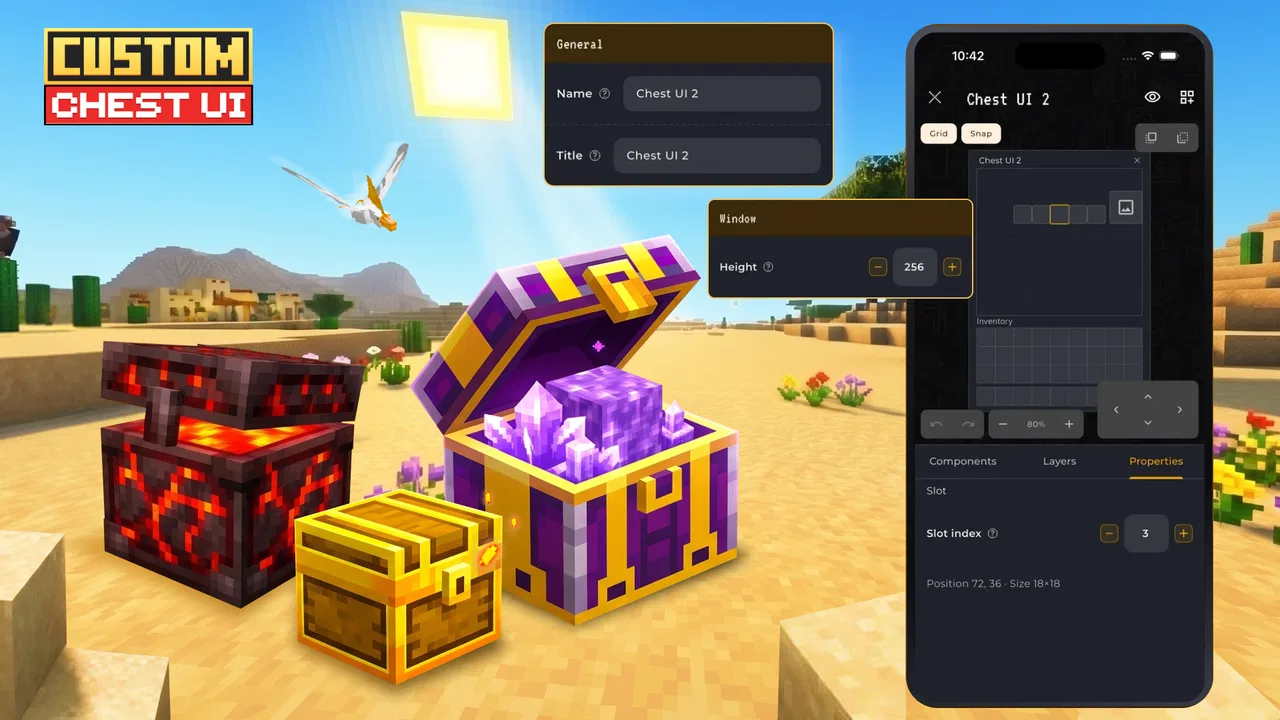
AddOns Maker for Minecraft PE is a creative tool that allows users to customize and enhance their Minecraft Pocket Edition gameplay. It provides an easy interface for creating unique textures, items, and mods without needing complex coding skills. Perfect for players looking to personalize their Minecraft experience.
02Is AddOns Maker for Minecraft PE free to use?
Yes, AddOns Maker for Minecraft PE is free to download and use, but it includes in-app purchases. These purchases can unlock additional features or provide an ad-free experience. Users can enjoy a wide range of functionalities without purchasing, but premium options offer enhanced customization tools.
03What features does AddOns Maker for Minecraft PE offer?
The app offers a variety of features, including the ability to create custom items, mobs, and blocks. Users can design unique textures and behaviors. It also provides a user-friendly interface with drag-and-drop functionality, making it accessible for beginners and advanced players alike.
04Is AddOns Maker for Minecraft PE safe to use?
Yes, the app is safe to use. It is regularly updated by the developers to ensure it remains secure and compatible with the latest Minecraft PE versions. However, always download it from official app stores to avoid potential security risks associated with unofficial sources.
05Do I need technical skills to use AddOns Maker for Minecraft PE?
No, technical skills are not required to use AddOns Maker for Minecraft PE. The app is designed with a user-friendly interface, allowing users to create and modify add-ons through simple steps. It includes tutorials and guides to help users navigate the features easily.
Pros
- Easy-to-use interface for beginners.
- Wide range of customization options.
- Regular updates with new features.
- Supports both iOS and Android devices.
- No coding skills required.
Cons
- Contains ads that can be intrusive.
- Limited features in the free version.
- Occasional crashes on older devices.
- Some features require in-app purchases.
- Exporting add-ons can be slow.

AddOns Maker for Minecraft
Gallery